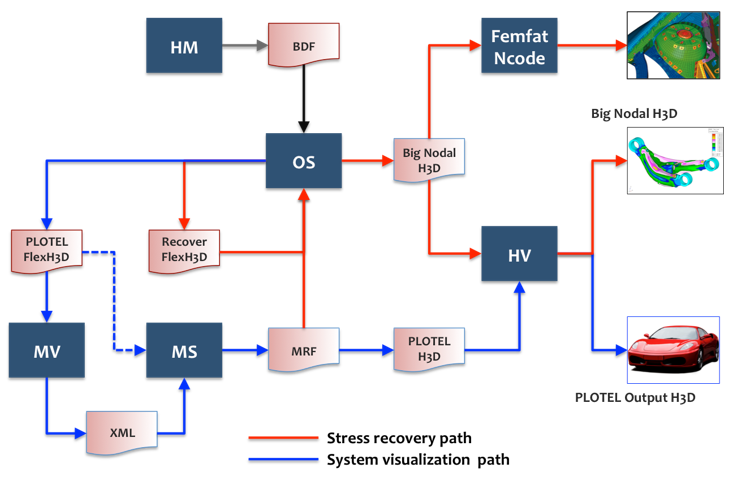
After a MotionSolve run, it is possible to recover displacements, velocities, accelerations, stresses, and strains for the flex-body in OptiStruct in order to create .op2 and .h3d results files for fatigue analysis. The procedure is explained as follows:
| • | First, you perform a MotionSolve simulation with a model that contains flexible bodies. MotionSolve creates a results file (*.mrf) that contains the modal participation factors at each time step for the Flex Body. |
| • | Next, in OptiStruct, perform a residual run to recover displacement, velocity, acceleration, stress, and strain results for interior girds and elements in the Flex Body based on the modal participation results from MotionSolve. In the residual run, the Flex Body filename_recov.h3d file and the .mrf results file are specified using the ASSIGN data: |
| - | ASSIGN, H3DMBD, 30101, ’pfbody_1_recov.h3d’ |
| - | ASSIGN, H3DMBD, 30102, ’pfbody_2_recov.h3d’ |
| - | ASSIGN, MBDINP, 10, ’pfbody.mrf’ |
The 10 in the ASSIGN, MBDINP data corresponds to the SUBCASE for which the MotionSolve results will be used. In SUBCASE 10, instead of performing a transient analysis, OptiStruct will just use the results from MotionSolve.
The 30101 and 30102 in the ASSIGN, H3DMBD data refer to the Flex Body ID’s in the .mrf file3.
|