|
»Click here to display Table of Contents«
|

Multiple Wizard Library |

|

|

|

|
|
Multiple Wizard Library |
|
|
|

|
|
»Click here to display Table of Contents«
|
Multiple Wizard Library |
|
|
|
|
|
Multiple Wizard Library |
|
|
|
|
You can now register multiple wizard libraries in MotionView at a given time and shift between one library and other very easily.
Benefits include:
| • | Add more libraries within MotionView |
More than one wizard library can be registered now by having multiple sets of following statements in a preference file
*RegisterAssemblyWizardFile
*RegisterTaskWizardFile
*RegisterWizardLibDir
These statements register the model wizard file, task wizard file & the library directory respectively.
These statements can be put in a preference file as shown below:
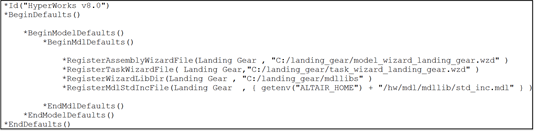
When the preference file is registered and loaded using File > Load > Preference File, the new library would be now available along with the existing libraries.
| • | Switch between the wizards very easily |
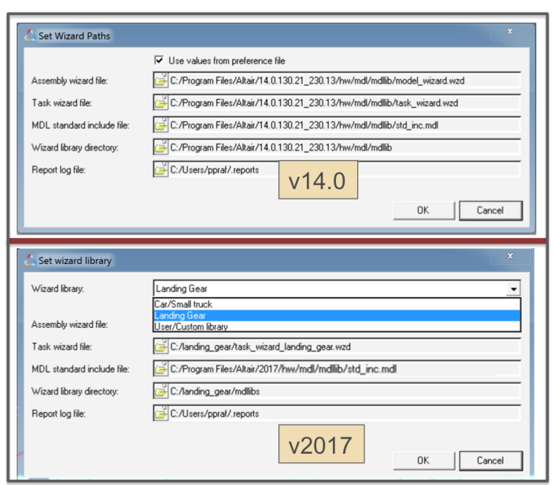
The Set Wizard path option under Model menu has been upgraded so that the user can change the current library very easily.