|
»Click here to display Table of Contents«
|

New Air Spring Entity |

|

|

|

|
|
New Air Spring Entity |
|
|
|

|
|
»Click here to display Table of Contents«
|
New Air Spring Entity |
|
|
|
|
|
New Air Spring Entity |
|
|
|
|
A new air spring model is available as an Auto Entity in MotionView. The air spring force is interpolated from a table of force verses spring height and static inflation pressure, which is typically published by spring manufacturers. You enter the spring trim load and trim height and MotionSolve calculates the static inflation pressure automatically. You may include a bumpstop with the air spring as well. The air spring and bumpstop force properties are read from TeimOrbit format property files.
To add an air spring to your MotionView model:
| • | Load the Vehicle Dynamics Tools preference file by picking Load > Preference File from the File menu in MotionView and then selecting the MBD Vehicle Dynamics Tools preference file. |
| • | Right click on the model in the browser and from the context menu pick “Add Auto Entity” to launch the Add Entity dialog. |
| • | In the Option menu on the Add Entity dialog pick “AutoAirSpring”, select single or pair, and click OK. |
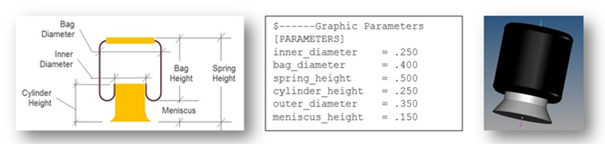
The AutoAirSpring sizes graphics based on parameters in the air spring property file. In MotionView, you can update the graphics from the property file by pushing the update graphics button on the air spring panel causing MotionSolve to read the air spring property file and re-size the graphics. The air-bag graphics have a toroidal top and bottom representative of rolling lobe air spring.